Related Topics
For Process Director v6.2.100 and higher, the Email Diagnostics page provides administrators with a record of emails sent by the system. This page is useful to search for and track email issues, such as failures to send notifications.
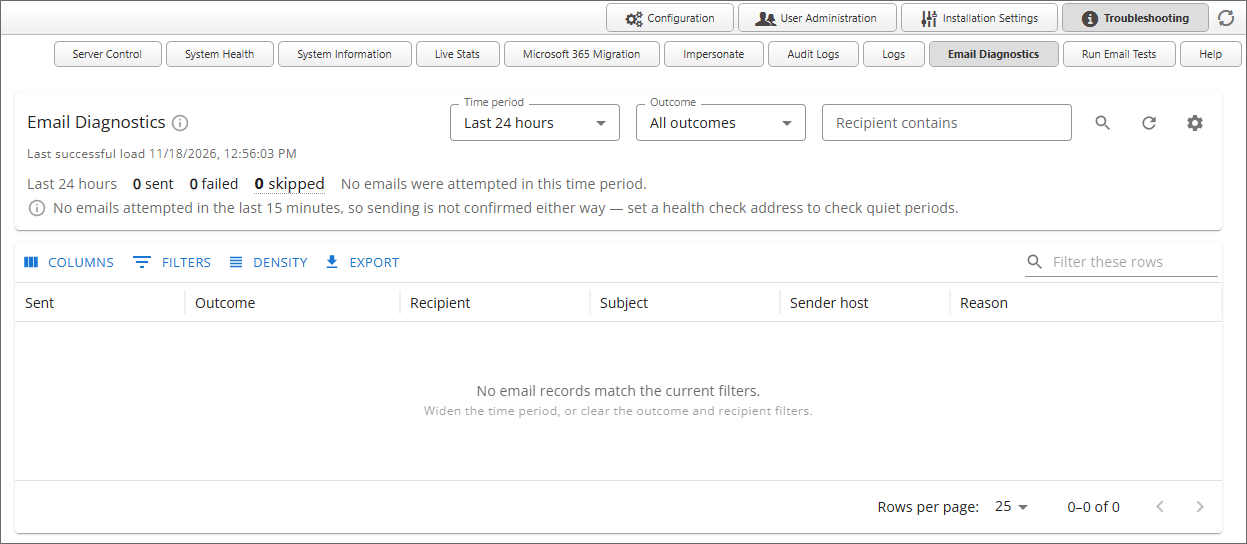
This page records email messages for up to 30 days, and enables you to search for different email results. There are three search filters.
- Time Period: Enables you to select the time period to search for email results.
- Outcome: The outcome to search for, e.g., Failures, Sent, etc.
- Recipient contains: Enables you to specify an email recipient for the search.
Results are displayed in a paginated grid that, by default, returns 25 records per page. At the top of the grid, the Columns, Filters, and Density buttons enable you to change the visual display of the results. The Export button enables you to export the results to a CSV file.
Documentation Feedback and Questions
If you notice some way that this document can be improved, we're happy to hear your suggestions. Similarly, if you can't find an answer you're looking for, ask it via feedback. Simply click on the button below to provide us with your feedback or ask a question. Please remember, though, that not every issue can be addressed through documentation. So, if you have a specific technical issue with Process Director, please open a support ticket.