Related Topics
For Process Director v6.1 200, a Custom Table Access page has been added to the Configuration section of the IT Admin area. This page lists all of the custom tables that have been created in the Internal User Database, such as tables created via an Excel file import, etc.
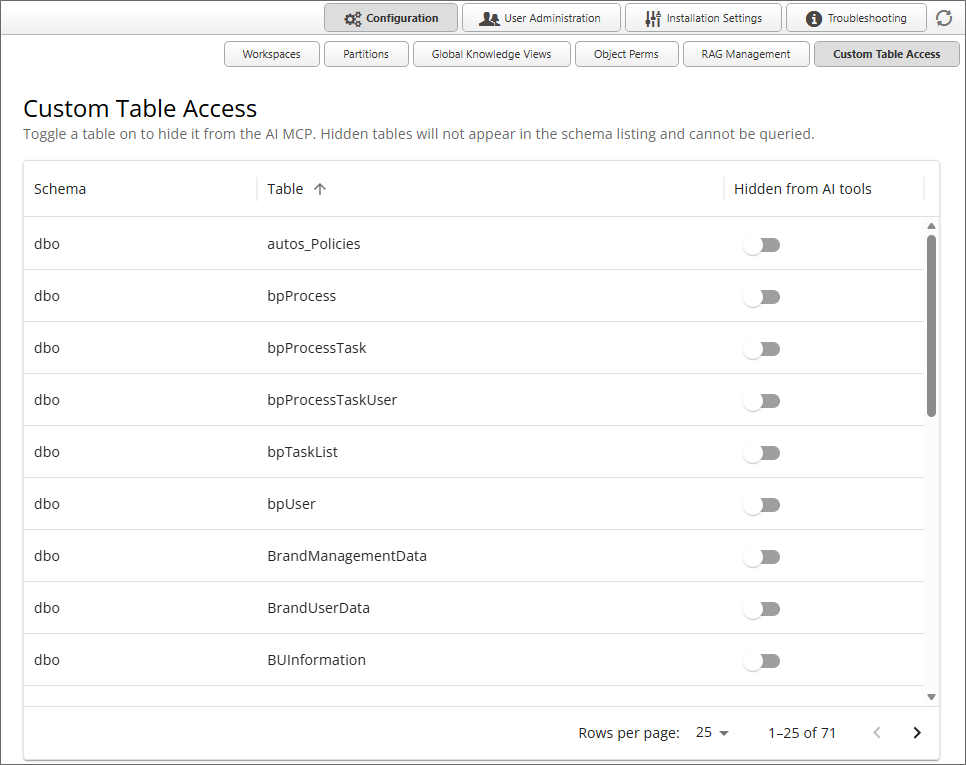
This page enables you to exclude any custom tables you wish from being accessed by an AI agent in the product. To exclude a table from any AI access, simply turn on the switch labeled, Hidden from AI tools, for the table(s) you wish to exclude. Once turned on for a table, no AI agent will be able to access the table, or any information contained in it.
By default, exclusion is turned off for all custom tables.
Documentation Feedback and Questions
If you notice some way that this document can be improved, we're happy to hear your suggestions. Similarly, if you can't find an answer you're looking for, ask it via feedback. Simply click on the button below to provide us with your feedback or ask a question. Please remember, though, that not every issue can be addressed through documentation. So, if you have a specific technical issue with Process Director, please open a support ticket.