Related Topics
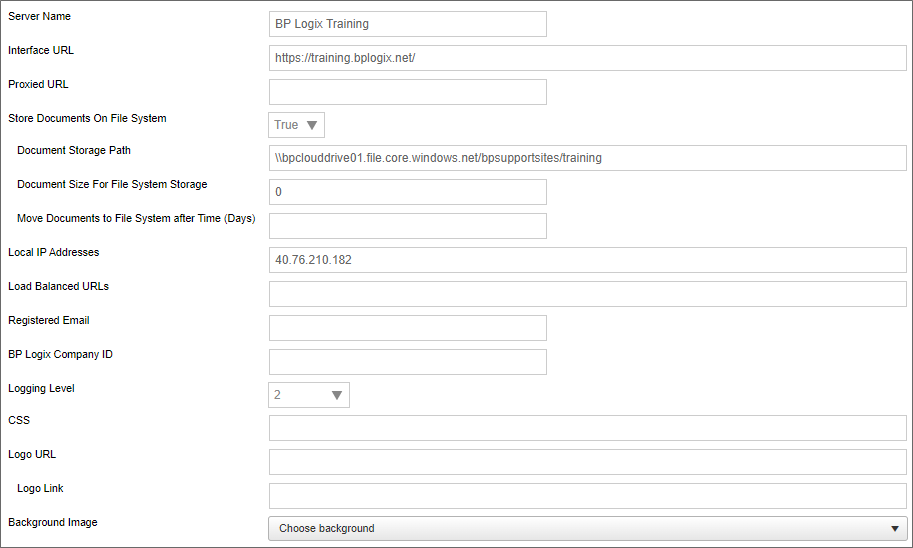
The Properties page lists the basic options to configure the Process Director Server, which helps maximize the flexibility of Process Director. Below is the list of options available on the Properties page.
 Server Name
The name for the Process Director installation.
Interface URL
Specifies the base URL of your Process Director Installation. The URL should end with a trailing slash (/). The value placed in this property can be accessed to use or display elsewhere in the product via the Interface URL system variable.
Proxy URL
Specifies the URL of your proxy server, if you have one in use.
Store Documents on File System
Enables you to store documents on the server file system. Setting this option will require you to set the Document Storage Path and Document Size for File System Storage properties. For more information about storing documents in the Process Director database as opposed to the file system, see the Storing Attachments topic.
There are times when you may want to store the binary data on a file system, instead of in the database. For example, if you are dealing with very large digital assets/documents, or a large number of them, storing them on the file system may be better. If your database gets too large with document data, it can slow functions like your database backups. When binaries are stored on the file system, you still will have entries in the internal document tables, but the BLOB column will be empty. It is transparent to the implementers and end-users where the document binaries are stored.
Document Storage Path
Actual file path to store files.
Document Size for File System Storage
Enables you to set the minimum size requirement of the file to be stored on the file system. If you want to store ALL files in the file system, set the value of this property to 0.
Move Documents to File System after Time (Days)
For Process Director v6.00.100 or higher, this property will accept a properly formatted date to move all documents with file dates prior to the specified date to file storage.
Local IP Addresses
Enables you to add a comma separated list of IP addresses that have permission to the IT Admin area of Process Director.
Load balanced URLs
Process Director incorporates load balancing to share the processing load between multiple Process Director installations. This property takes a comma-separated list of URLs that are part of the load balancing scheme.
Registered Email
This is an email address to use as a fallback "From" address for process notifications if one of the primary email addresses isn't available. The "From" address for a process notification is set by the first value that isn't empty from the following list:
- The value manually configured in an email template's EmailData Control.
- The value configured the Workflow From Email Address setting in the Installation Settings > Global Variables section.
- If administratively Canceled, the email of the administrator that performed the operation.
- The email of the Process Initiator.
- The value configured in the Registered Email Address.
- As a final fallback: tech-support@bplogix.com
 For users of Process Director v5.27 and higher, Process Director enables the use of address strings with a Display Name component (e.g. "Test User <test@example.com>").
BP Logix Company ID
This property stores the 5-digit customer number that BP Logix assigns to each customer. While largely optional, this field is used to send Logs via email on the logs page.
Logging Level
Enables you to set a specific logging level that may provide more information in the logs.
CSS
Enables you to specify a custom CSS file. It is recommended to place the CSS file in the custom directory of the Process Director install.
Logo URL
Enables you to specify an image to replace the logo throughout the system. Additionally you can specify a hotlink for the logo.
Logo Link
Enables you to specify a URL to which users will be sent if they click the logo image.
Background Image
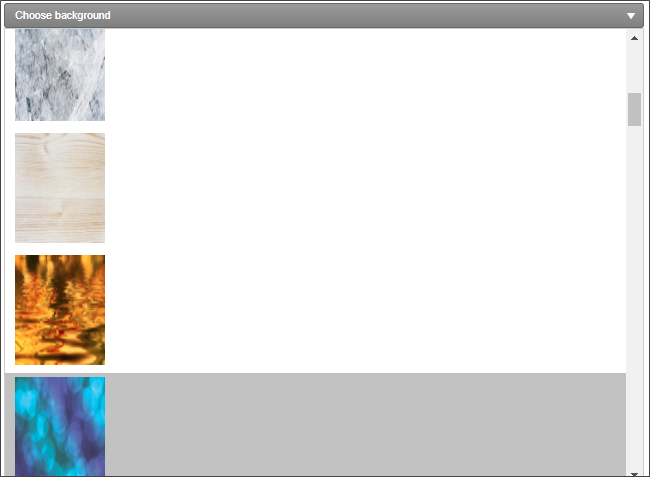
Enables you to specify a pre-defined background image to display in the background of the Login page. A number of stock images are displayed in the dropdown control enabling you to select the desired background image.
Background Image Sizing
Enables you to specify how the background image will appear on the login page. The following options are available:
- Cover: The image will expand to fill the entire page background.
- Center: The image will appear in its actual size, centered on the page vertically and horizontally.
- Tile: The image will appear in its actual size, aligned to the top left of the window, and will tile vertically and horizontally.
- Tile X: The image will appear in its actual size, aligned to the top left of the window, and will tile along the X-axis only.
- Tile Y: The image will appear in its actual size, aligned to the top left of the window, and will tile along the Y-axis only.
Home Page Top Height
Enables you to adjust the height of the top navigation bar.
Home Page Logo Width
Enables you to specify the width of the logo displayed at the top right of the page.
SMTP Authentication Type
Depending on your product version there are up to four available options for this property setting. If you are not using SMTP email relay to automatically relay mail to your email server, and require authentication with the server prior to sending mail, you must select one of the available authentication options.
- Standard Authentication (No Oauth): For systems that use standard user authentication via a user name and password.
- Office365/Microsoft OAuth: For Process Director v5.44.1103 and higher, this option enables an OAuth-based connection to Azure services using the OAuth Microsoft (ROPC) service.
- Google OAuth: For Process Director v6.1.300 and higher, this option enables connection to Google mail servers with Google's OAuth authentication service.
- Microsoft Graph API: For Process Director v6.1.506 and higher, this option adds an SMTP authentication type that enables email functionality for customers whose Microsoft/Entra ID tenants enforce Multi-Factor Authentication (MFA) for email access.
When set to any authentication type other that Standard Authentication (No OAuth), additional property settings will be available, depending on the Authentication Type selected. For some authentication types, the SMTP UserID and SMTP Password properties will be inapplicable, and will not be displayed.
Office365/Microsoft OAuth and Microsoft Graph API
Both of these authentication types use Microsoft Modern Authentication (MMA), which is Microsoft's implementation of OAuth authentication. MMA requires you to configure three additional properties:
- SMTP Tenant ID
- SMTP Client ID
- SMTP Secret
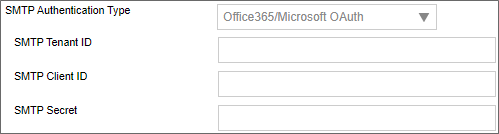
Please see the Microsoft OAuth for SMTP topic for more information on the configuration and use of these Authentication Type options, and their associated properties.
Google OAuth

Google OAuth authentication requires two additional properties.
- SMTP JSON: This property consists of a JSON snippet, provided by your Google Console. The JSON must be pasted into this property, and will be used to send the appropriate JSON authentication data to Google.
- SMTP UserID: This property is the Google UserID, usually an email address, to log into the specific inbox that will be used to send messages via Google.
SMTP Host
Enables you to set a host name or IP address for the SMTP Host. By default it will use the local SMTP server. Setting this property also allows you to set the SMTP Port, SMTP UserID, and SMTP Password, and SSL Required properties.
You do have some different options for sending mail from the system.
- Using “relay” through your existing mail server (e.g. Azure/Exchange, etc.)
- This method requires that your mail server enables relay. This can be controlled by IP address and/or the use of credentials to connect to your SMTP mail server.
- If your mail server can't return quickly from a large number of mail request, this could slow the end user experience in Process Director when the completion of a form results in process emails being sent out. To work around this, you can use option #3. This will perform a store and forward that won't be delayed with slowdowns in the email server responding.
- Using the local IIS SMTP server to send the emails directly to the recipients
- This method will send emails from the local SMTP server. It may be necessary to setup a DNS SPF, DKIM or reverse DNS record for this server so recipients don't flag these emails as SPAM.
- Using the local IIS SMTP server to relay through your mail server using the “Smart Host” configuration.
- This method requires that your mail server enables relay from this IP address. It will forward all emails through your mail server using a store/forward technique, allowing retries.
- Relaying through a mail provider (e.g. SMTP.com)
- This method requires that a provider be created and that recipients will allow emails sent from this domain to be received.
BP Logix recommends that you enable your mail server to accept mail relay from the IP Address of the process Director server, and set the SMTP host to the mail server name, e.g., relay.domain_name.com. This will provide the most direct connection to your mail server, and enable your mail server to impose organizational policies, and return error messages to Process Director.
SMTP Port
The SMTP port used to send email. The default SMTP port is 25 for unencrypted connections. For encrypted connections, BP Logix recommends using port 587 and enabling the SSL Required property.
For more information on SMTP connections to Microsoft Azure, please see Microsoft's documentation on this topic.
SMTP UserID/Password
SMTP UserID: The User Name for the email account that will be used to send email.
SMTP Password: The Password for the email account that will be used to send email.
For Process Director v6.1.200 and higher, both of these fields are now disabled by default. Some password managers can automatically insert unwanted values into user name and password fields automatically, without the user being aware of it. To prevent this inadvertent and unwanted behavior, these fields cannot be edited unless the user enables them by clicking one of the Modify buttons next to the field value.

Clicking one of the Modify buttons will enable its associated field, so that the field can be edited.
SSL Required
Determines whether the connection to the SMTP server will require SSL to encrypt the UserID and password when sent to the SMTP server. This setting is required to be enabled when using encrypted connections.
Web Service Enabled
Enables you to enable or disable Web Services for the system. Additionally you can add restrictions. Setting this property allows you to set the Require Web Service Authentication and Web Service Restrictions properties.
Require Web Service Authentication
Determines whether authentication is required to use a web service.
Web Service Restrictions
A comma-separated list of IP Addresses that you enter into this field, which will restrict access to web services to only requests from the IP Addresses entered. Leaving this field blank will allow universal access to web services.
In addition to a comma-separated list of IP Addresses, this field also supports CIDR notation for an IP Address range, e.g., "10.1.1.0/24" will use all IP Addresses between 10.1.1.0 and 10.1.1.24.
Number of Custom Icons
Enables you to set the number of custom icons that you can use in the Process Director interface. The default setting is 0. If you create any custom icons, you must set this value to the exact number of custom icons that you have created. For information on creating custom icons, please see the Creating Custom Icons topic.
Enable trust MFA for 30 days
This property, when set to true, will enable the system to limit requests for MFA authentication confirmation to once every thirty days. This setting is somewhat out of order, and it appears below the M365 CDA settings at the bottom of the page.
Microsoft 365 CDA Installation Settings #
A PDF file for end-to-end Azure/Entra configuration for all Process Director features can be found here: Configuring Azure For Process Director (PDF Download)
For Process Director v6.1.300 and higher, the product supports the use of Microsoft 365 for CDA. All prior versions can use only the third-party document editing service provided by OnlyOffice. The implementation of M365 for CDA requires several properties be configured on the Installation Settings > Properties page.
Microsoft 365 SharePoint CDA Site URL
The URL of the SharePoint/M365 site that hosts the office installation.
Microsoft 365 SharePoint CDA Root Folder
The root folder in which the documents will be stored for access via CDA.
Microsoft 365 Tenant ID
-
The ID of the Tenant in which the registered application resides in Azure/Entra. Creation of an application requires the existence of a Tenant.
-
The Tenant ID is displayed as the Directory (tenant) ID property on the Overview page of your AAD Application in Azure, but this value will also be displayed following
login.microsoft.com/...in the Endpoint URLs that the App references.
Like SMTP, This is an OAuth property to enable authentication with Microsoft.
Microsoft 365 CDA Client ID
-
The ID of the Application in SharePoint.
-
This value is displayed as the Application (client) ID property on the Overview page of your application from the "Site" application registration.
Microsoft 365 CDA Client Secret
The client secret or application password the administrator created to use with the application.
Microsoft 365 CDA Advanced options (optional)
A list of options to pass to your M365 system, using JSON format.
 This property should only be configured at the direction of BP Logix support personnel.
For Process Director v6.1.305 and higher, some additional properties have been added.
Microsoft 365 CDA Certificate
This property enables you to upload the certificate required to accept document uploads for use as attachments to be edited via M365 CDA.
Microsoft 365 CDA Certificate Password
The password needed to access the uploaded certificate.
Requirements for using the BP Logix Default SMTP Configuration
In most cases Cloud customers configure their outgoing SMTP configuration to send email from within their own domains, using their own mail servers. For these customers, emails can continue to be sent from your domain without any additional configuration.
Customers can, however, elect to use the default SMTP host provided by BP Logix. In this configuration, Process Director uses SMTP.com to send outbound email. If you wish to use your own domain's email addresses, rather than a bplogix.com email address, you must create additional DNS records in your domain to add SPF and DKIM records before you can send mail from the system.
As part of global efforts to combat spam, many email systems have implemented stricter security to ensure emails aren't being "spoofed" which is to say, emails from one domain giving the appearance of being sent from a different domain. Spoofing is often used to disguise the actual source of a malicious email message, by using email addresses from a trusted domain, to make them look like authentic messages from a trusted email address.
To ensure that emails sent via SMTP.com can use your domain addresses, and be considered as legitimate email messages, you will need to add two DNS records to your domain's DNS settings: an SPF record and a DKIM record.
- The SPF record tells receiving mail servers that Process Director (via SMTP.com) is authorized to send emails on behalf of your domain.
- The DKIM record adds a digital signature to your outgoing emails, helping verify authenticity and improve email deliverability.
Please work with your DNS provider or IT team to add the DNS records below to the domain from which you wish to send emails.
SPF Record
| FIELD | VALUE |
|---|---|
| Record Type | TXT
|
| Content / Value | v=spf1 include:_spf.smtp.com ~all
|
DKIM Record (Standard)
| FIELD | VALUE |
|---|---|
| Record Type | CNAME
|
| Host Name | smtpkey._domainkey.yourdomain.com
|
| Content / Value | smtpcustomer._domainkey.smtpsend.com
|
DKIM Record (GoDaddy)
If your domain is hosted on GoDaddy, use the following DKIM configuration instead of the standard one above.
| FIELD | VALUE |
|---|---|
| Record Type | CNAME
|
| Host Name | smtpmail._domainkey (your domain is assumed) |
| Content / Value | smtpcustomer._domainkey.smtpsend.com
|
Without creating the appropriate SPF and DKIM records, your outgoing email messages will be rejected.
Documentation Feedback and Questions
If you notice some way that this document can be improved, we're happy to hear your suggestions. Similarly, if you can't find an answer you're looking for, ask it via feedback. Simply click on the button below to provide us with your feedback or ask a question. Please remember, though, that not every issue can be addressed through documentation. So, if you have a specific technical issue with Process Director, please open a support ticket.